Versions
Upload packages up to 1 GB. Each installation shows the version it should run and the one it reports.
Apps
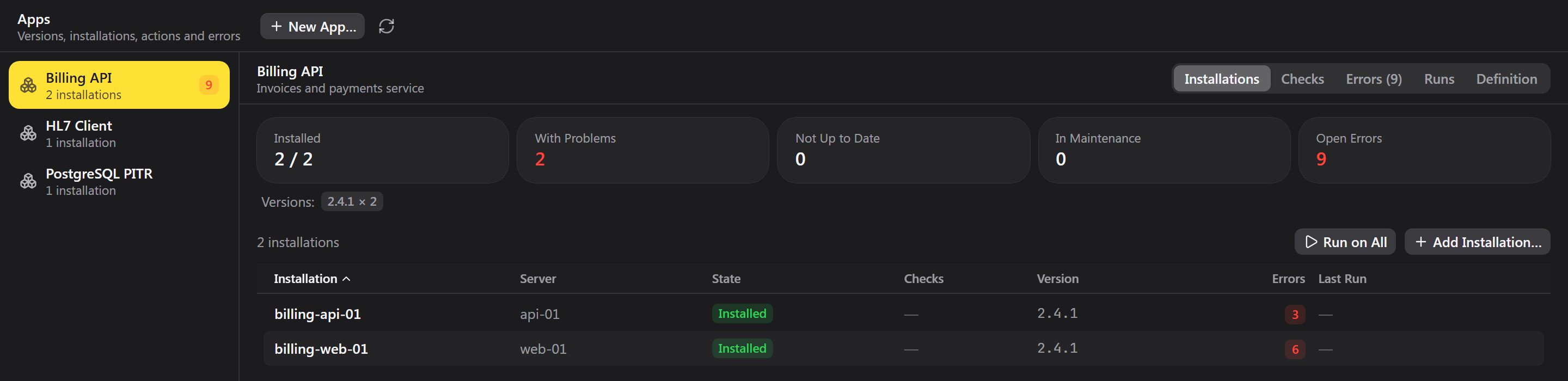
Define an app once: its versions, settings, actions and checks. Then see every installation across your servers, which ones are out of date, which are failing and what errors they are throwing. You write how it installs, as a script or a playbook. Zedlin runs it and watches the result.
Deploy and operate
Zedlin doesn't need to know what's inside. HL7 clients, PITR backups, your own services: it treats them all the same.
Upload packages up to 1 GB. Each installation shows the version it should run and the one it reports.
Deploy, restart, rotate: a shell script or an Ansible playbook, with parameters and required levels.
One installation or all of them, with live output per install.
Variables per app and per installation. Secrets are passed over stdin and never written to disk.
Check templates become that server's checks, and stay quiet while it is being installed or in maintenance.
Silence an installation for an hour or up to 30 days. If a check is still red afterwards, it alerts.
Errors
Point your app at Zedlin the way you'd point it at an error tracker.
Use the official Sentry SDKs with a Zedlin DSN, or send plain JSON from curl or a logger.
The same error becomes one issue with counts, first and last release, and the install it came from.
A resolved issue that comes back opens again and notifies people.
Apps that run where Zedlin can't reach can report in, and Zedlin notices when they go quiet.
Apps run on a Zedlin server you host yourself. Write to us to try it early.